Fielmann Finder®
An interactive React-based prototype bringing Fielmann’s 3D Virtual Try-On experience to life, enabling user testing, informed interaction design decisions, and faster iteration for the Fielmann Finder®.
Date
2020
Role
UX Design & Prototyping
Client
Fielmann AG
Situation
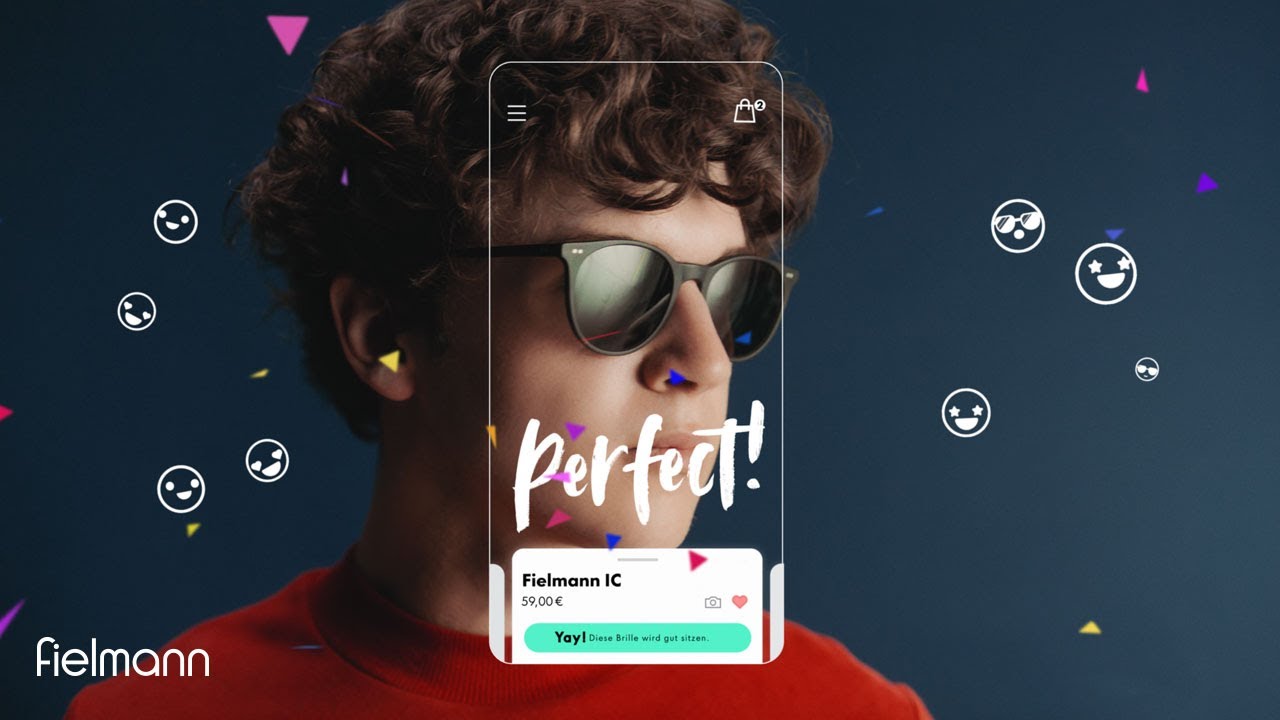
Fielmann was developing the Fielmann Finder® — a digital experience that lets users discover, virtually try on, and get personalized recommendations for sunglasses in 3D. The underlying technology was Fittingbox's Virtual Try-On (VTO), which rendered realistic 3D glasses on a user's face in real time.
The problem: this VTO technology couldn't run inside standard UIWebViews or common prototyping tools like Framer or Protopie. That meant the team had no way to test the actual try-on experience with real users, iterate on interaction design, or demonstrate the concept to stakeholders — without building the production app itself. The team needed a functional prototype that could bring the full experience to life, but the usual UX prototyping toolkit wasn't up to the job.
Situation
Fielmann was developing the Fielmann Finder® — a digital experience that lets users discover, virtually try on, and get personalized recommendations for sunglasses in 3D. The underlying technology was Fittingbox's Virtual Try-On (VTO), which rendered realistic 3D glasses on a user's face in real time.
The problem: this VTO technology couldn't run inside standard UIWebViews or common prototyping tools like Framer or Protopie. That meant the team had no way to test the actual try-on experience with real users, iterate on interaction design, or demonstrate the concept to stakeholders — without building the production app itself. The team needed a functional prototype that could bring the full experience to life, but the usual UX prototyping toolkit wasn't up to the job.
Situation
Fielmann was developing the Fielmann Finder® — a digital experience that lets users discover, virtually try on, and get personalized recommendations for sunglasses in 3D. The underlying technology was Fittingbox's Virtual Try-On (VTO), which rendered realistic 3D glasses on a user's face in real time.
The problem: this VTO technology couldn't run inside standard UIWebViews or common prototyping tools like Framer or Protopie. That meant the team had no way to test the actual try-on experience with real users, iterate on interaction design, or demonstrate the concept to stakeholders — without building the production app itself. The team needed a functional prototype that could bring the full experience to life, but the usual UX prototyping toolkit wasn't up to the job.
Task
As UX designer and prototyper, I was responsible for:
Solving the technical constraint: Finding a way to prototype the VTO experience outside of conventional tools, so the team could actually test and iterate on it.
Building a functional prototype: Creating an interactive, realistic prototype that covered the core user journey — trying on sunglasses, browsing recommendations, saving favorites, and adding to cart.
Enabling user testing: Delivering a prototype robust enough to put in front of real users for research sessions.
Supporting stakeholder alignment: Making it possible to demo different states and development stages to various audiences — from researchers to product leadership.
Task
As UX designer and prototyper, I was responsible for:
Solving the technical constraint: Finding a way to prototype the VTO experience outside of conventional tools, so the team could actually test and iterate on it.
Building a functional prototype: Creating an interactive, realistic prototype that covered the core user journey — trying on sunglasses, browsing recommendations, saving favorites, and adding to cart.
Enabling user testing: Delivering a prototype robust enough to put in front of real users for research sessions.
Supporting stakeholder alignment: Making it possible to demo different states and development stages to various audiences — from researchers to product leadership.
Task
As UX designer and prototyper, I was responsible for:
Solving the technical constraint: Finding a way to prototype the VTO experience outside of conventional tools, so the team could actually test and iterate on it.
Building a functional prototype: Creating an interactive, realistic prototype that covered the core user journey — trying on sunglasses, browsing recommendations, saving favorites, and adding to cart.
Enabling user testing: Delivering a prototype robust enough to put in front of real users for research sessions.
Supporting stakeholder alignment: Making it possible to demo different states and development stages to various audiences — from researchers to product leadership.
Action
Building a React-based prototype from scratch Since no off-the-shelf prototyping tool could handle the VTO integration, I built the prototype in ReactJS — a decision driven by technical necessity, not preference. This allowed me to embed Fittingbox's VTO technology directly and create a fully interactive experience: users could try on sunglasses in 3D, browse options, save favorites, and add items to their cart, just as they would in the real product.
Integrating real product data To make the prototype feel authentic — and to avoid the credibility gap of placeholder content — I pulled real product data and imagery from existing APIs via NodeJS. This meant users in testing sessions interacted with actual Fielmann products, not dummy content, producing more reliable feedback.
Implementing feature toggles for flexibility Different audiences needed to see different things. I built feature toggles into the prototype so the team could present tailored versions: a stripped-down flow for focused usability testing, a feature-complete demo for stakeholder reviews, or specific development stages for engineering alignment. One prototype, multiple use cases.
Bridging design and engineering Beyond user testing, the prototype served as a tangible reference for software engineering — demonstrating interaction patterns, edge cases, and technical feasibility in a way that static mockups never could. It became a shared artifact that aligned designers, researchers, product owners, and developers around a common vision.
Action
Building a React-based prototype from scratch Since no off-the-shelf prototyping tool could handle the VTO integration, I built the prototype in ReactJS — a decision driven by technical necessity, not preference. This allowed me to embed Fittingbox's VTO technology directly and create a fully interactive experience: users could try on sunglasses in 3D, browse options, save favorites, and add items to their cart, just as they would in the real product.
Integrating real product data To make the prototype feel authentic — and to avoid the credibility gap of placeholder content — I pulled real product data and imagery from existing APIs via NodeJS. This meant users in testing sessions interacted with actual Fielmann products, not dummy content, producing more reliable feedback.
Implementing feature toggles for flexibility Different audiences needed to see different things. I built feature toggles into the prototype so the team could present tailored versions: a stripped-down flow for focused usability testing, a feature-complete demo for stakeholder reviews, or specific development stages for engineering alignment. One prototype, multiple use cases.
Bridging design and engineering Beyond user testing, the prototype served as a tangible reference for software engineering — demonstrating interaction patterns, edge cases, and technical feasibility in a way that static mockups never could. It became a shared artifact that aligned designers, researchers, product owners, and developers around a common vision.
Action
Building a React-based prototype from scratch Since no off-the-shelf prototyping tool could handle the VTO integration, I built the prototype in ReactJS — a decision driven by technical necessity, not preference. This allowed me to embed Fittingbox's VTO technology directly and create a fully interactive experience: users could try on sunglasses in 3D, browse options, save favorites, and add items to their cart, just as they would in the real product.
Integrating real product data To make the prototype feel authentic — and to avoid the credibility gap of placeholder content — I pulled real product data and imagery from existing APIs via NodeJS. This meant users in testing sessions interacted with actual Fielmann products, not dummy content, producing more reliable feedback.
Implementing feature toggles for flexibility Different audiences needed to see different things. I built feature toggles into the prototype so the team could present tailored versions: a stripped-down flow for focused usability testing, a feature-complete demo for stakeholder reviews, or specific development stages for engineering alignment. One prototype, multiple use cases.
Bridging design and engineering Beyond user testing, the prototype served as a tangible reference for software engineering — demonstrating interaction patterns, edge cases, and technical feasibility in a way that static mockups never could. It became a shared artifact that aligned designers, researchers, product owners, and developers around a common vision.
Result
The React-based prototype became a central tool in the Fielmann Finder® development process:
Unlocked user testing for a VTO experience that was previously impossible to prototype with standard tools — putting real 3D try-on interactions in front of users for the first time.
Accelerated decision-making by giving stakeholders something tangible to react to, reducing abstract debates and aligning the team around concrete interaction patterns.
Enabled rapid iteration — design ideas could be tested, validated, and refined in the prototype without waiting for production development cycles.
Served as a development blueprint — the working prototype with real data and feature toggles gave engineering a clear, functional reference for implementation.
This project demonstrated that prototyping isn't just about fidelity — it's about finding the right tool for the problem. When conventional tools couldn't handle the technical constraints, building a custom solution unlocked the entire design and research process.
Result
The React-based prototype became a central tool in the Fielmann Finder® development process:
Unlocked user testing for a VTO experience that was previously impossible to prototype with standard tools — putting real 3D try-on interactions in front of users for the first time.
Accelerated decision-making by giving stakeholders something tangible to react to, reducing abstract debates and aligning the team around concrete interaction patterns.
Enabled rapid iteration — design ideas could be tested, validated, and refined in the prototype without waiting for production development cycles.
Served as a development blueprint — the working prototype with real data and feature toggles gave engineering a clear, functional reference for implementation.
This project demonstrated that prototyping isn't just about fidelity — it's about finding the right tool for the problem. When conventional tools couldn't handle the technical constraints, building a custom solution unlocked the entire design and research process.
Result
The React-based prototype became a central tool in the Fielmann Finder® development process:
Unlocked user testing for a VTO experience that was previously impossible to prototype with standard tools — putting real 3D try-on interactions in front of users for the first time.
Accelerated decision-making by giving stakeholders something tangible to react to, reducing abstract debates and aligning the team around concrete interaction patterns.
Enabled rapid iteration — design ideas could be tested, validated, and refined in the prototype without waiting for production development cycles.
Served as a development blueprint — the working prototype with real data and feature toggles gave engineering a clear, functional reference for implementation.
This project demonstrated that prototyping isn't just about fidelity — it's about finding the right tool for the problem. When conventional tools couldn't handle the technical constraints, building a custom solution unlocked the entire design and research process.